> ## Documentation Index
> Fetch the complete documentation index at: https://docs.rightfoot.com/llms.txt
> Use this file to discover all available pages before exploring further.
# Processor Keys in the Portal
> Add, tag and manage your processor keys from the Rightfoot portal — no API call needed
# Processor Keys in the Portal
Everything the [key endpoints](/api-reference/payments/create-payment-connection) do is also available in the Rightfoot portal, under **Payments → Connection**. Use it when the person who holds the keys at your [payment processor](/api-reference/payments/create-payment-connection#supported-processors) is not the person wiring the integration — nothing on this page needs an API call, and the keys it saves are the same ones the API lists.
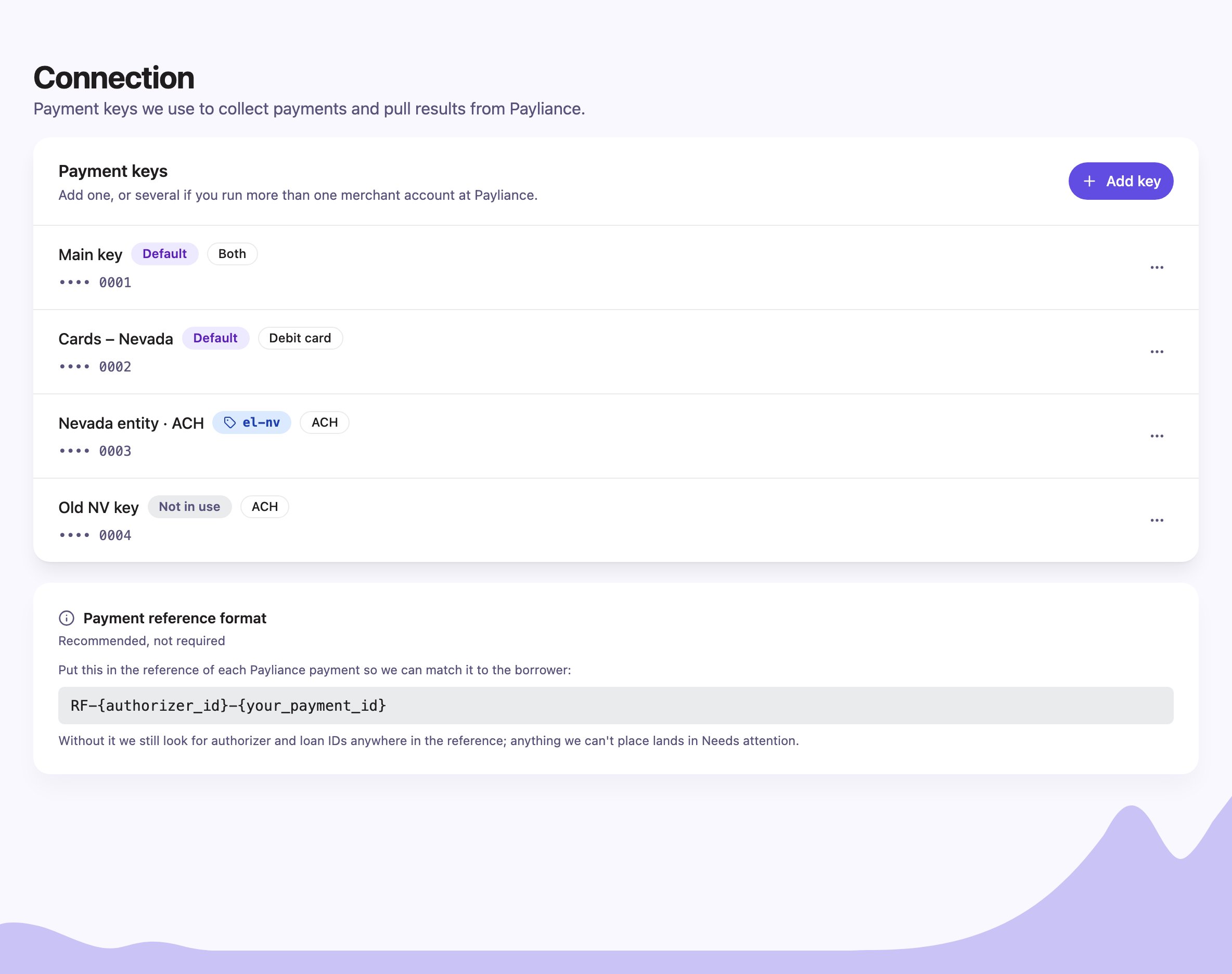 If you don't see **Payments** in the portal sidebar, ask Rightfoot to enable it for your account.
## Add a key
1. Click **Add key** and paste the key from your processor. It is stored in a vault as soon as you save; afterwards the page shows only its last four characters.
2. **How should we use it?** — choose **Default key** for accounts you enroll without a tag, or **Tagged key** for accounts you enroll with one. A key is one or the other.
3. **Which payments can it take?** — **ACH**, **Debit card**, or **Both**. Pick what the merchant account behind the key is set up for.
4. For a tagged key, enter the **Tag**: lowercase letters, numbers, dashes or underscores. Send the same value as `merchant_ref` when you enroll those borrowers. It cannot be changed after saving.
5. Give the key a **Label**. The portal suggests one from your choices; it only appears in the portal, and you can rename it any time.
If you don't see **Payments** in the portal sidebar, ask Rightfoot to enable it for your account.
## Add a key
1. Click **Add key** and paste the key from your processor. It is stored in a vault as soon as you save; afterwards the page shows only its last four characters.
2. **How should we use it?** — choose **Default key** for accounts you enroll without a tag, or **Tagged key** for accounts you enroll with one. A key is one or the other.
3. **Which payments can it take?** — **ACH**, **Debit card**, or **Both**. Pick what the merchant account behind the key is set up for.
4. For a tagged key, enter the **Tag**: lowercase letters, numbers, dashes or underscores. Send the same value as `merchant_ref` when you enroll those borrowers. It cannot be changed after saving.
5. Give the key a **Label**. The portal suggests one from your choices; it only appears in the portal, and you can rename it any time.
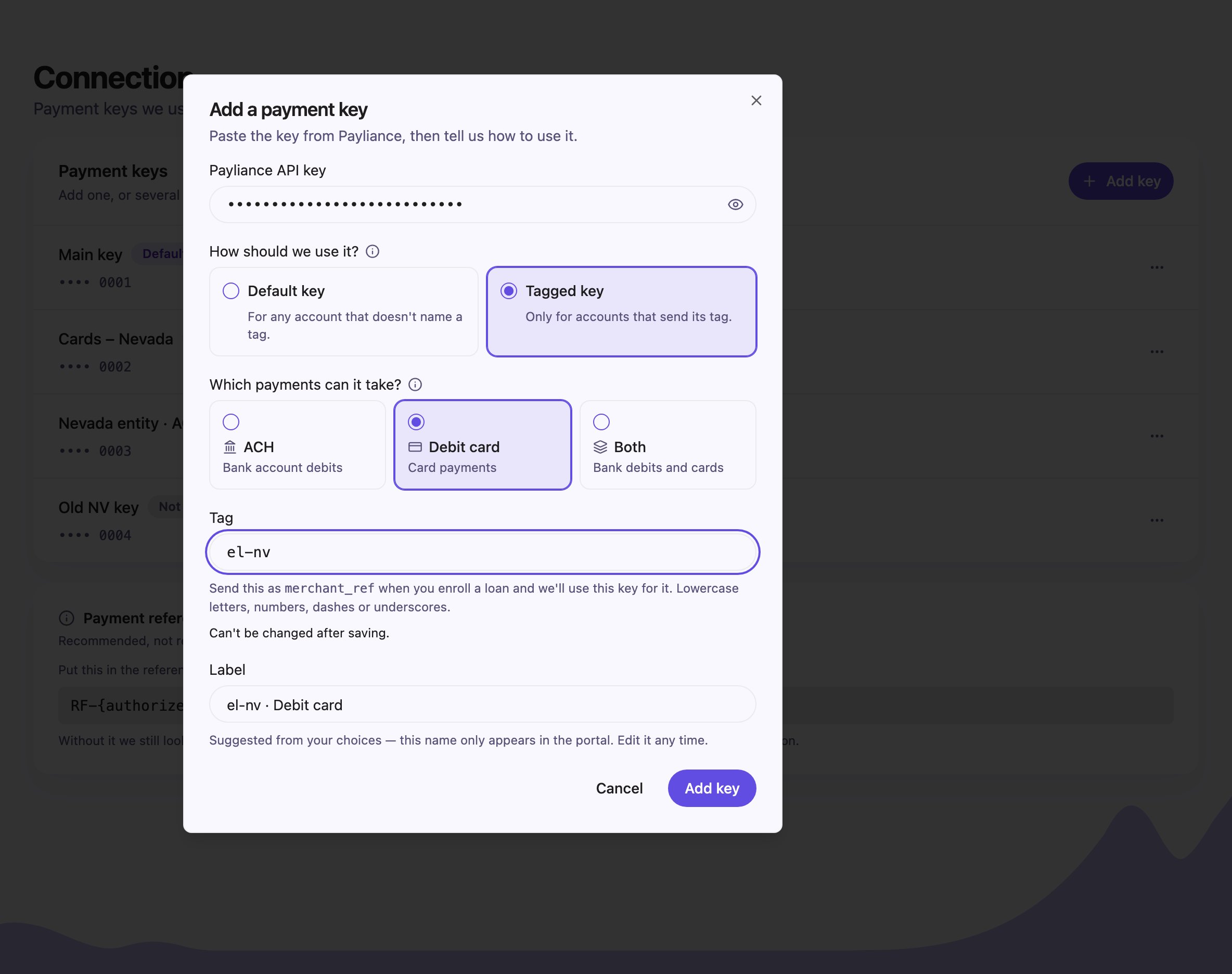 Every field in the dialog is a field on [`POST /v1/payment_connections`](/api-reference/payments/create-payment-connection):
| In the portal | In the API |
| ----------------------------------------------------- | ------------------------------------- |
| Processor API key | `api_key` |
| How should we use it? → **Default key** | `is_default: true` |
| How should we use it? → **Tagged key**, plus **Tag** | `merchant_ref` |
| Which payments can it take? → ACH / Debit card / Both | `rail_scope`: `ach` / `card` / `both` |
| Label | `label` |
## Which keys do you need?
* **Your merchant accounts are split by payment type only** — one for ACH, one for cards. Add each as a **Default key** with the matching payment type, or a single **Default key** set to **Both** if one account takes everything. Nothing extra is needed on enrollment: Rightfoot picks the key by the payment type being used.
* **Your merchant accounts are split by entity, state or brand.** Add each as a **Tagged key** and send its tag as `merchant_ref` when you enroll those borrowers. You can still keep a **Default key** for anyone enrolled without a tag.
* **Both.** A tag can hold one key per payment type, so `acme-nv` can have an ACH key and a debit-card key.
## Keep every payment type covered
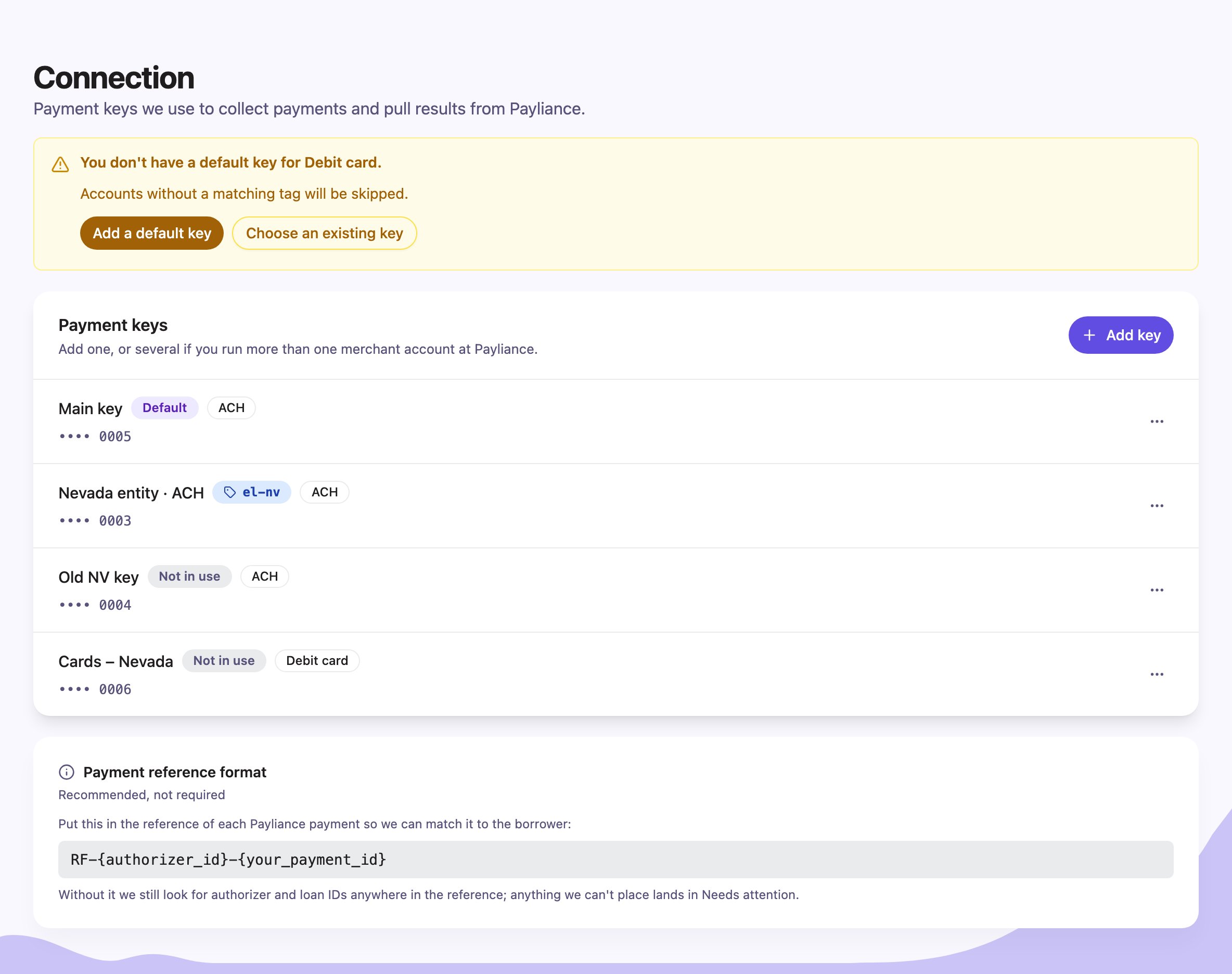
A payment type with no default key skips every borrower enrolled without a tag. The page warns you and offers two fixes: **Add a default key**, or **Choose an existing key** to promote a saved key that is not in use.
Every field in the dialog is a field on [`POST /v1/payment_connections`](/api-reference/payments/create-payment-connection):
| In the portal | In the API |
| ----------------------------------------------------- | ------------------------------------- |
| Processor API key | `api_key` |
| How should we use it? → **Default key** | `is_default: true` |
| How should we use it? → **Tagged key**, plus **Tag** | `merchant_ref` |
| Which payments can it take? → ACH / Debit card / Both | `rail_scope`: `ach` / `card` / `both` |
| Label | `label` |
## Which keys do you need?
* **Your merchant accounts are split by payment type only** — one for ACH, one for cards. Add each as a **Default key** with the matching payment type, or a single **Default key** set to **Both** if one account takes everything. Nothing extra is needed on enrollment: Rightfoot picks the key by the payment type being used.
* **Your merchant accounts are split by entity, state or brand.** Add each as a **Tagged key** and send its tag as `merchant_ref` when you enroll those borrowers. You can still keep a **Default key** for anyone enrolled without a tag.
* **Both.** A tag can hold one key per payment type, so `acme-nv` can have an ACH key and a debit-card key.
## Keep every payment type covered
A payment type with no default key skips every borrower enrolled without a tag. The page warns you and offers two fixes: **Add a default key**, or **Choose an existing key** to promote a saved key that is not in use.
 ## Manage a key
Open the row menu (**⋯**) on any key.
| Action | What it does | In the API |
| ---------------------------------------- | ------------------------------------------------------------------------------------------------------------------------- | ----------------------------------------------------------------------------------------------------- |
| **Make default** / **Remove as default** | Makes an untagged key the default for its payment types, swapping with the current default; or stops it being the default | [`PATCH` with `is_default`](/api-reference/payments/update-payment-connection#make-a-key-the-default) |
| **Edit** | Rename the key or change which payments it takes | [`PATCH` with `label` or `rail_scope`](/api-reference/payments/update-payment-connection) |
| **Replace key** | Paste a new key from your processor. The old one is revoked; the tag, label and payment types stay | [`PATCH` with `api_key`](/api-reference/payments/update-payment-connection#replace-a-key) |
| **Delete** | Revokes the key at the processor and removes it. Payments already collected are kept | [`DELETE`](/api-reference/payments/delete-payment-connection) |
A tagged key is never offered **Make default** — a tag is a deliberate choice. To serve borrowers enrolled without a tag, add or promote an untagged key.
The **Payment reference format** card at the bottom of the page is about matching, not keys: put `RF-{authorizer_id}-{your_payment_id}` in the reference of each payment you create at the processor so Rightfoot can match its result to the borrower.
## Manage a key
Open the row menu (**⋯**) on any key.
| Action | What it does | In the API |
| ---------------------------------------- | ------------------------------------------------------------------------------------------------------------------------- | ----------------------------------------------------------------------------------------------------- |
| **Make default** / **Remove as default** | Makes an untagged key the default for its payment types, swapping with the current default; or stops it being the default | [`PATCH` with `is_default`](/api-reference/payments/update-payment-connection#make-a-key-the-default) |
| **Edit** | Rename the key or change which payments it takes | [`PATCH` with `label` or `rail_scope`](/api-reference/payments/update-payment-connection) |
| **Replace key** | Paste a new key from your processor. The old one is revoked; the tag, label and payment types stay | [`PATCH` with `api_key`](/api-reference/payments/update-payment-connection#replace-a-key) |
| **Delete** | Revokes the key at the processor and removes it. Payments already collected are kept | [`DELETE`](/api-reference/payments/delete-payment-connection) |
A tagged key is never offered **Make default** — a tag is a deliberate choice. To serve borrowers enrolled without a tag, add or promote an untagged key.
The **Payment reference format** card at the bottom of the page is about matching, not keys: put `RF-{authorizer_id}-{your_payment_id}` in the reference of each payment you create at the processor so Rightfoot can match its result to the borrower.